Unity License Operator Guide

The Unity License Operator Guide

This Unity License Operator guide helps you set up, activate, and manage your Unity license.

Quick overview

5 min

to complete setup

Licenses Available

The Guide

Introduction

The Unity License Operator program keeps global connectivity resilient in 2025 by auditing telecom and enterprise networks in real time.

Run the Unity app to join a people-powered edge network that audits carrier and enterprise systems. By contributing real-world telemetry from your device, you help detect fraud, prevent revenue loss, and uncover risks, outages, and inefficiencies.

This step-by-step Unity License Operator guide walks you through activation, setup, tasks, rewards, and withdrawals so you can operate confidently within the Unity network.
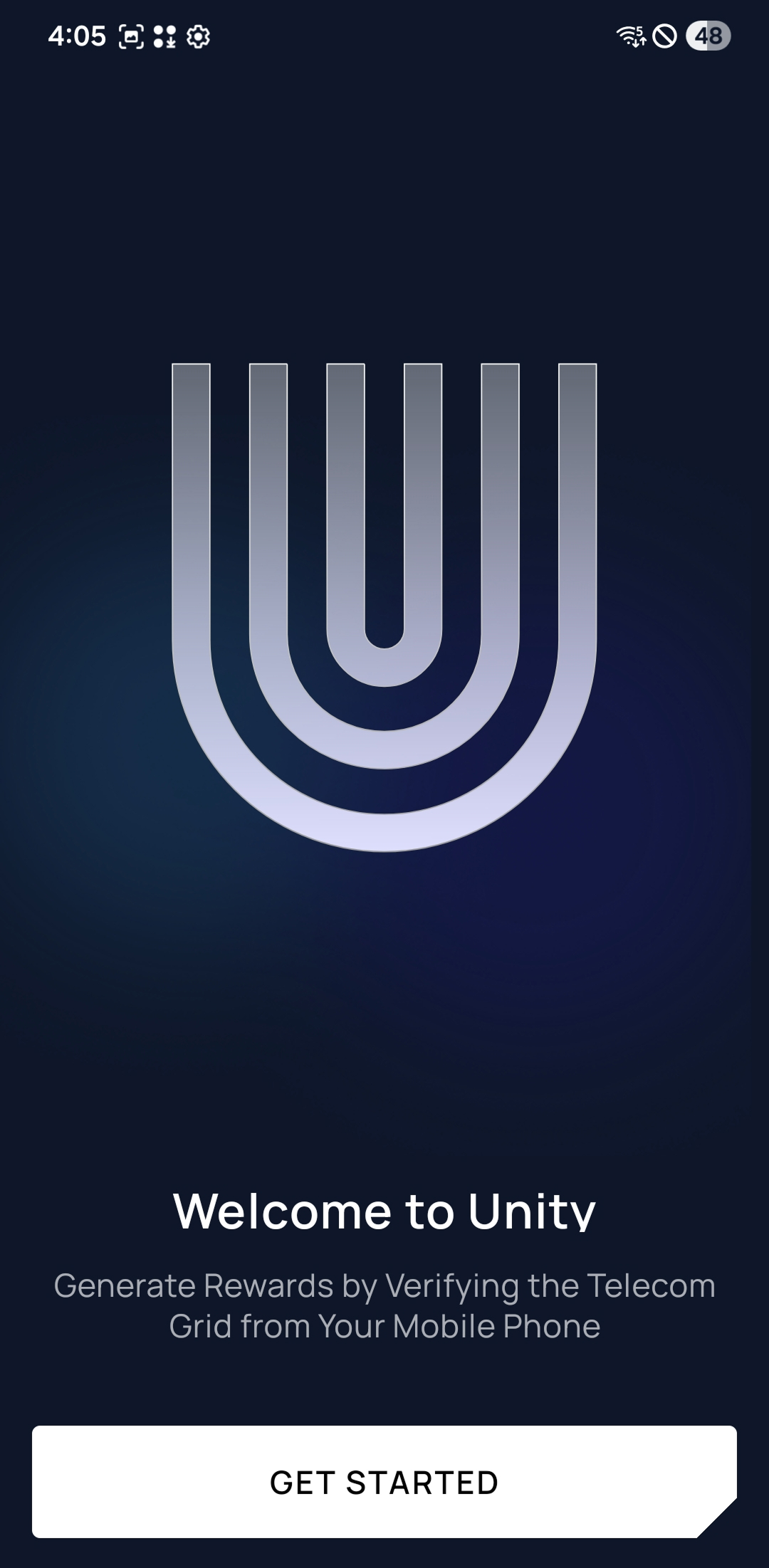
Unity app preview

Requirements

Before activating your Unity License, make sure your device and setup meet the requirements below. Doing so ensures smooth operation and maximizes your rewards.

Compatible Device

A smartphone or tablet running Android 6+ or iOS 15+.

Connectivity

Keep your device powered and online so background tasks run reliably.

How to Set Up Your Unity App

Follow these steps to create your account, link your devices and activate your Unity License for rewards participation.
1

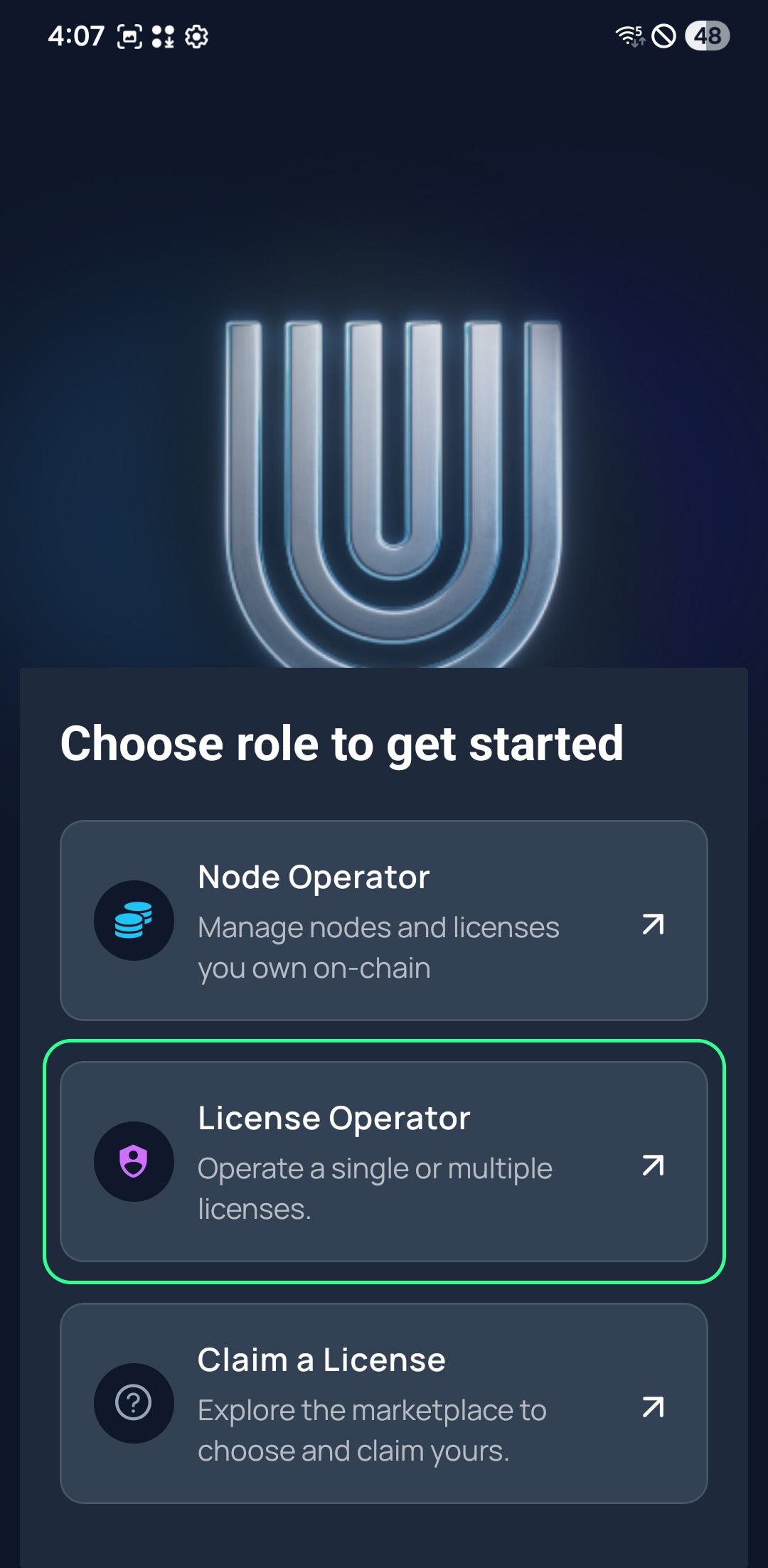
Choose “License Operator”

Unity app role selection screen with License Operator highlighted

Open the Unity app and select “License Operator.”

Confirm that you want to manage licenses from this device. This establishes your device as an active operator within the Unity ecosystem.
2

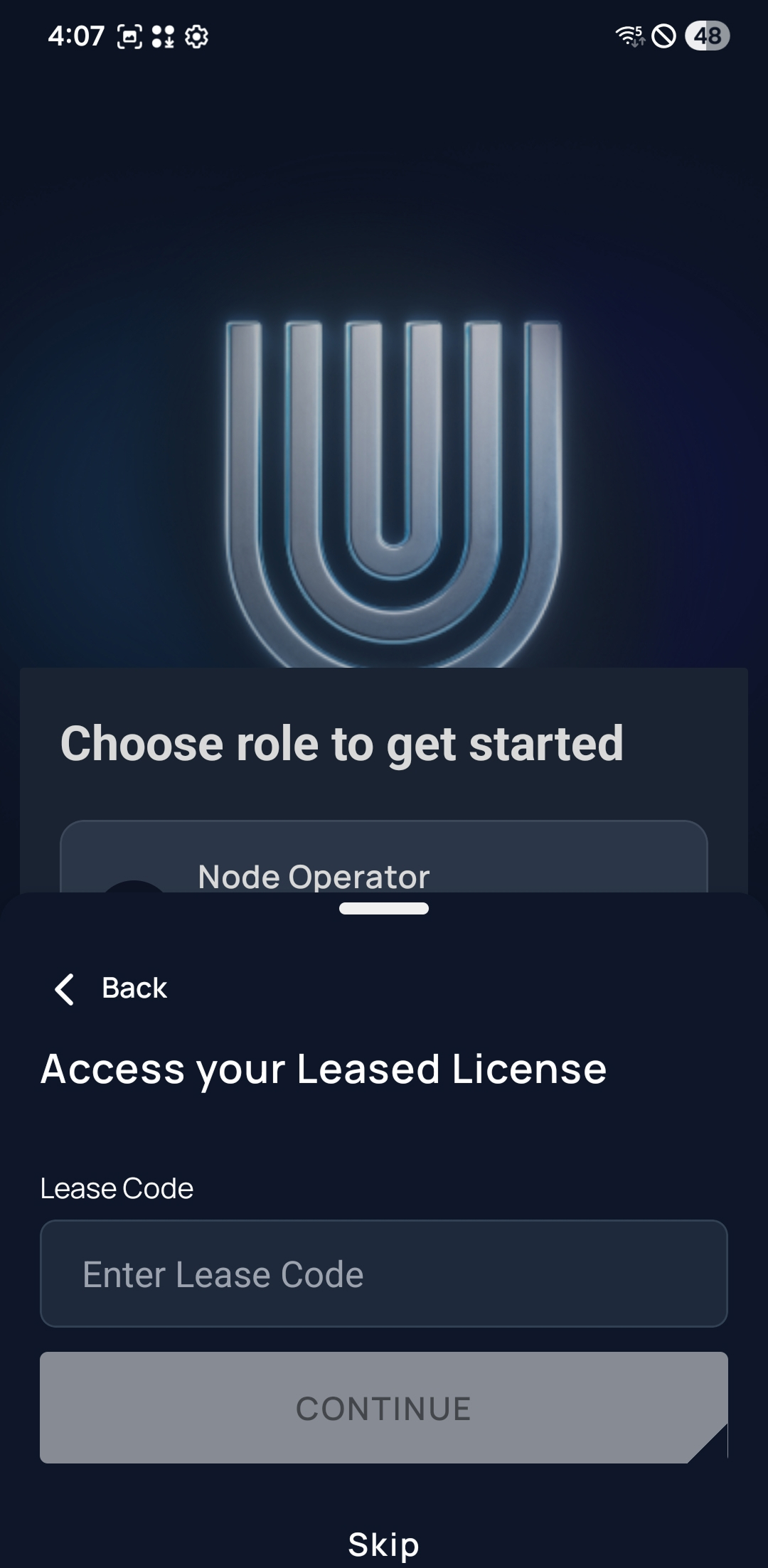
Enter Your Lease Code

Lease code entry screen inside the Unity app

Input the Lease Code provided by your Node Operator.

If you don’t have a Lease Code yet, check our available codes at unitynodes.club or ask us on Telegram.
Available Lease Codes

RD-987c19566-8e2e-4ea7-8efa-acec458cdadc271c8958-bbc9-437f-9bd8-82ec6a0940575e280fc0-35c9-4060-a1bc-4e16bdfc6cef179f3687-b4e1-4fab-a4bb-cd3ff2cc6c47
3

Sign in to Unity

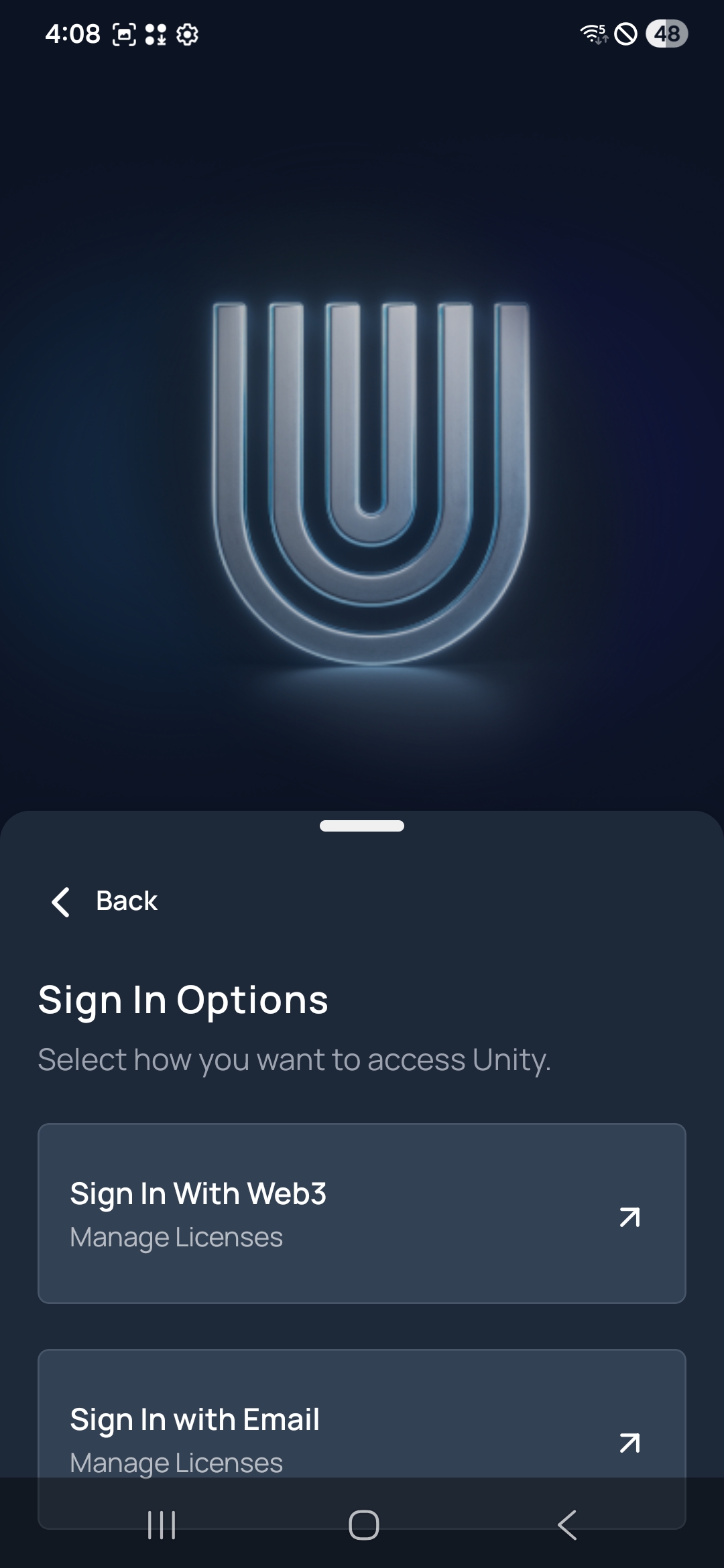
Unity app sign-in screen showing wallet and email options

Complete sign-in to connect your account securely.

You can sign in using either a Web3 wallet or an email address with a one-time passcode (OTP). Choose whichever method you prefer to verify ownership and link your device.
Option 1: Web3 Wallet+
Select “Wallet”, connect your crypto wallet, and approve the sign-in request to verify ownership.
Option 2: Email + OTP+
Select “Email”, enter your address, tap “Continue”, and confirm the one-time passcode sent to your inbox.
4

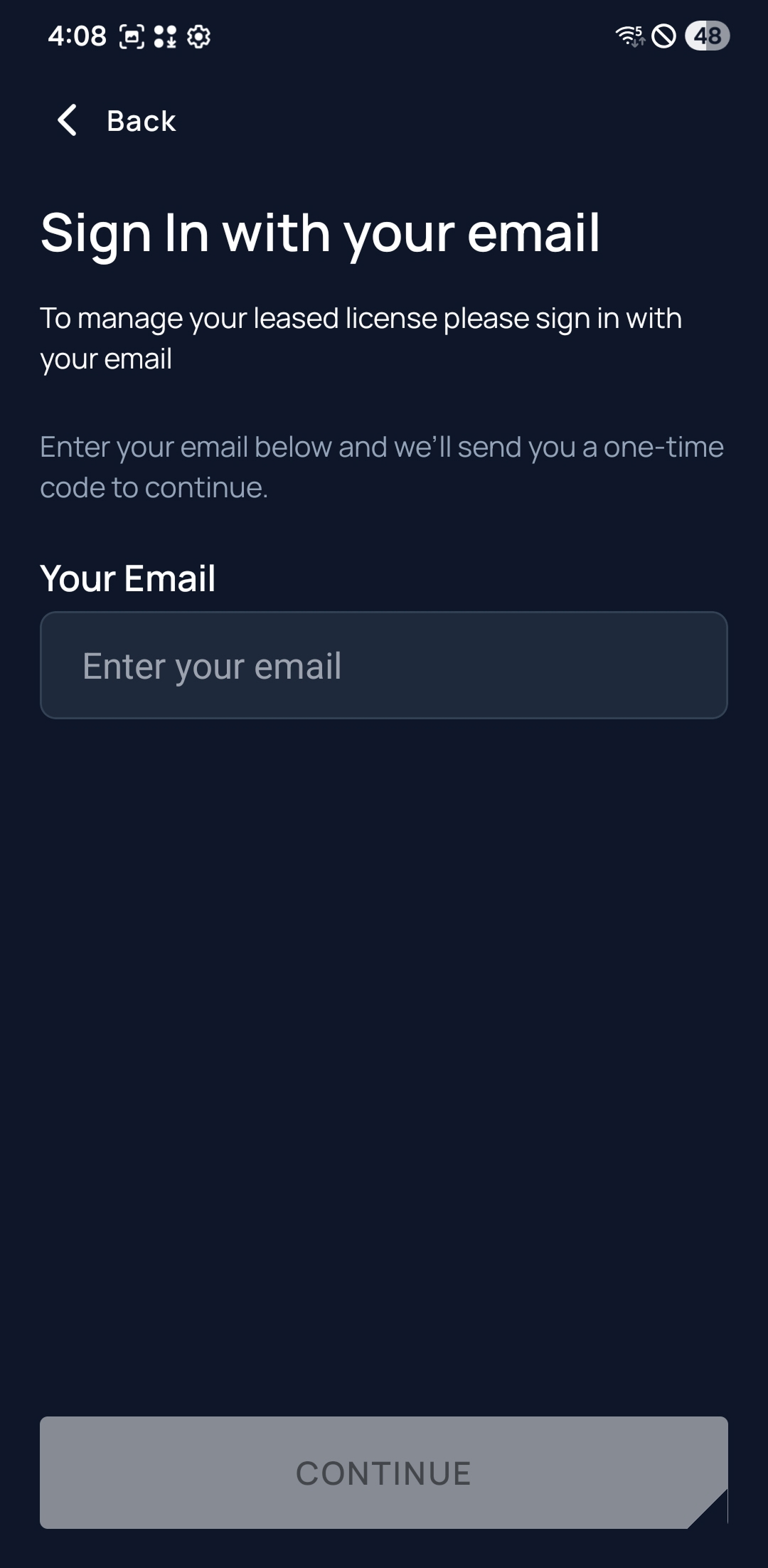
Sign in with Your Email

Unity app screen prompting for email address with Continue button

Enter your email to receive a one-time code.

Sign in with the email you want to use to manage your Unity License Operator account.

Type your address into the “Your Email” field, then press Continue to have a one-time code sent to your inbox.
5

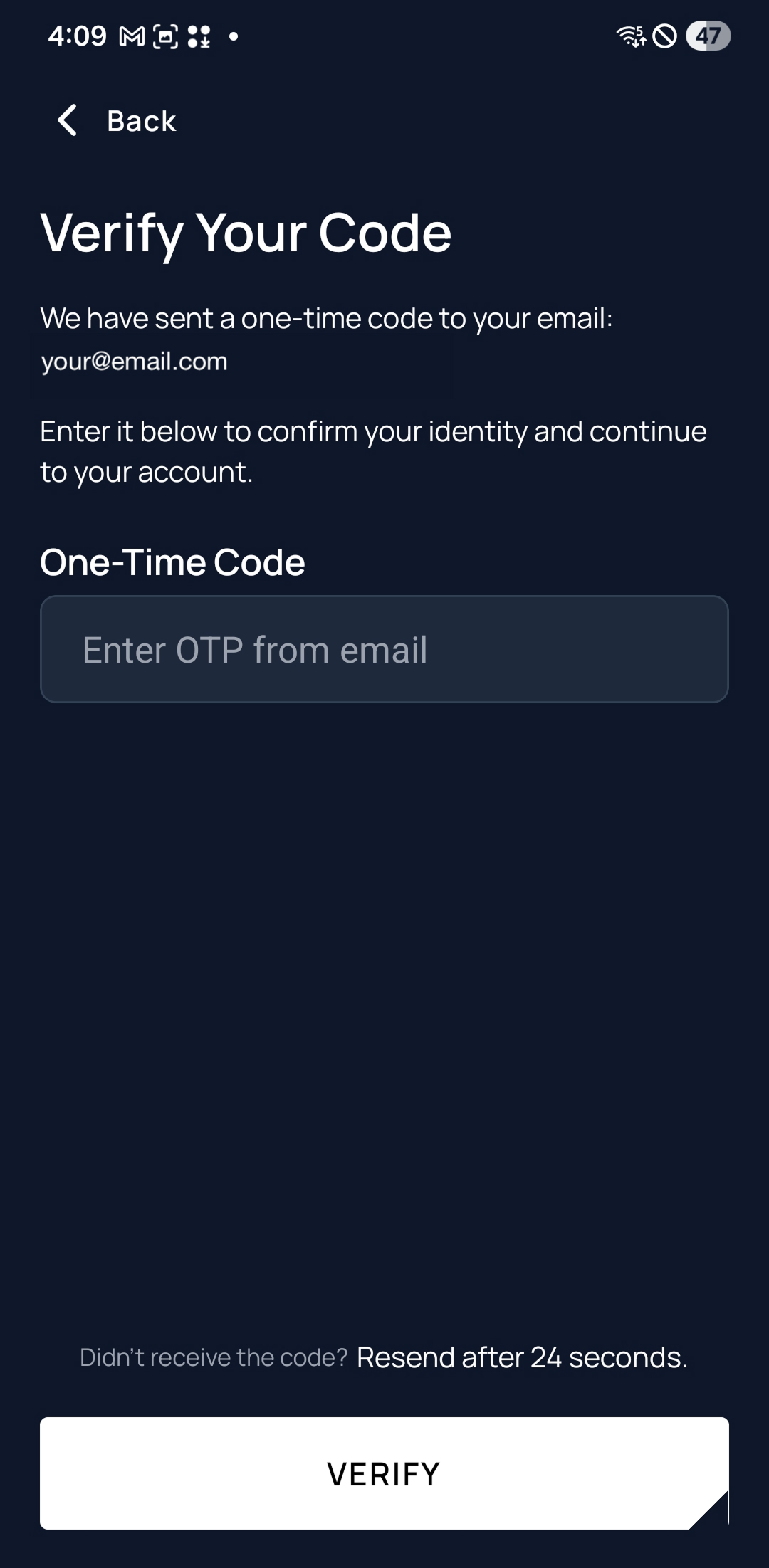
Verify Your Code

Unity app screen requesting the one-time passcode with resend option

Check your email for the one-time passcode and enter it to finish signing in.

You will receive a one-time code to the email address you entered. Open the message to retrieve your code.

Enter the digits in the “One-Time Code” box, then tap Verify. If the code hasn’t arrived yet, you can request another after the countdown completes.

How to Claim a Unity License

Claiming a Unity License lets your device join the Unity network. Follow these steps to browse, review, and activate a license on your device.

1

Select “Claim a License”

Unity app showing Claim a License option in the menu

Open the Unity app menu and tap “Claim a License.”

This takes you directly to the Unity Marketplace, where available licenses can be viewed and leased from Node Operators.

2

Explore the Marketplace

Unity Marketplace showing filters for license search

Browse available licenses to find one that matches your preferences.

You can filter results by status and lease duration to narrow your search and compare opportunities easily.

3

View License Details

Unity license detail page with duration and split information

Tap any license card to review its terms.

Each listing shows the lease duration, reward split, and performance expectations. Make sure the agreement fits your intended participation before proceeding.

4

Claim Your License

Unity confirmation screen after claiming a license

Finalise your claim.

Tap "Claim License". Once confirmed, your active license will appear under “My Licenses.”

Bind a License

Bind an available Unity License to your device from the Work tab to start earning rewards.
1

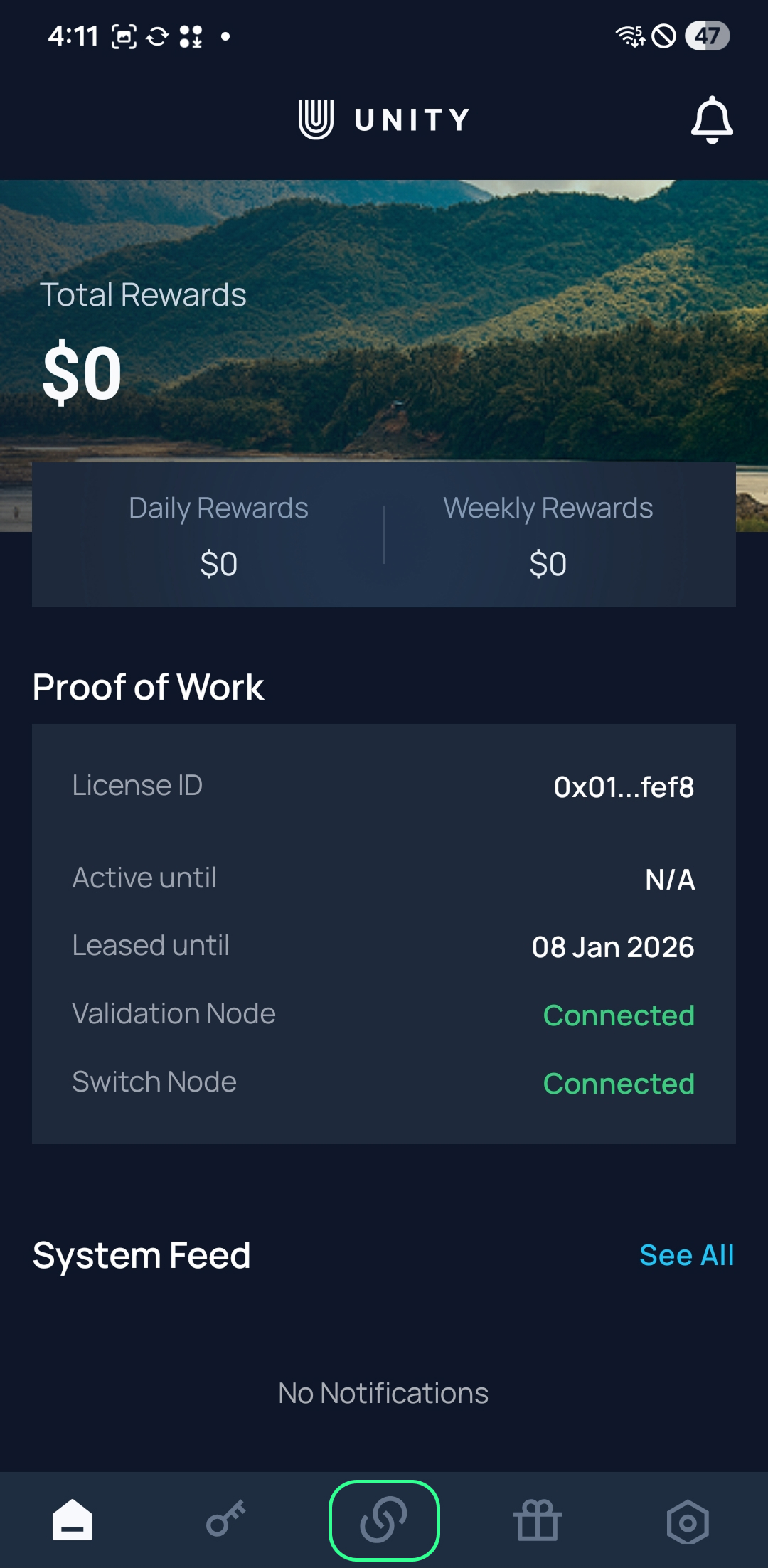
Step 1: Open the Work tab

Unity app showing the Work tab on the dashboard

From the dashboard, tap Work in the bottom navigation to view or bind your device.
  • If your device is not yet bound, you’ll see available licenses to bind.
  • If your device is already bound, you’ll see its active license listed.
2

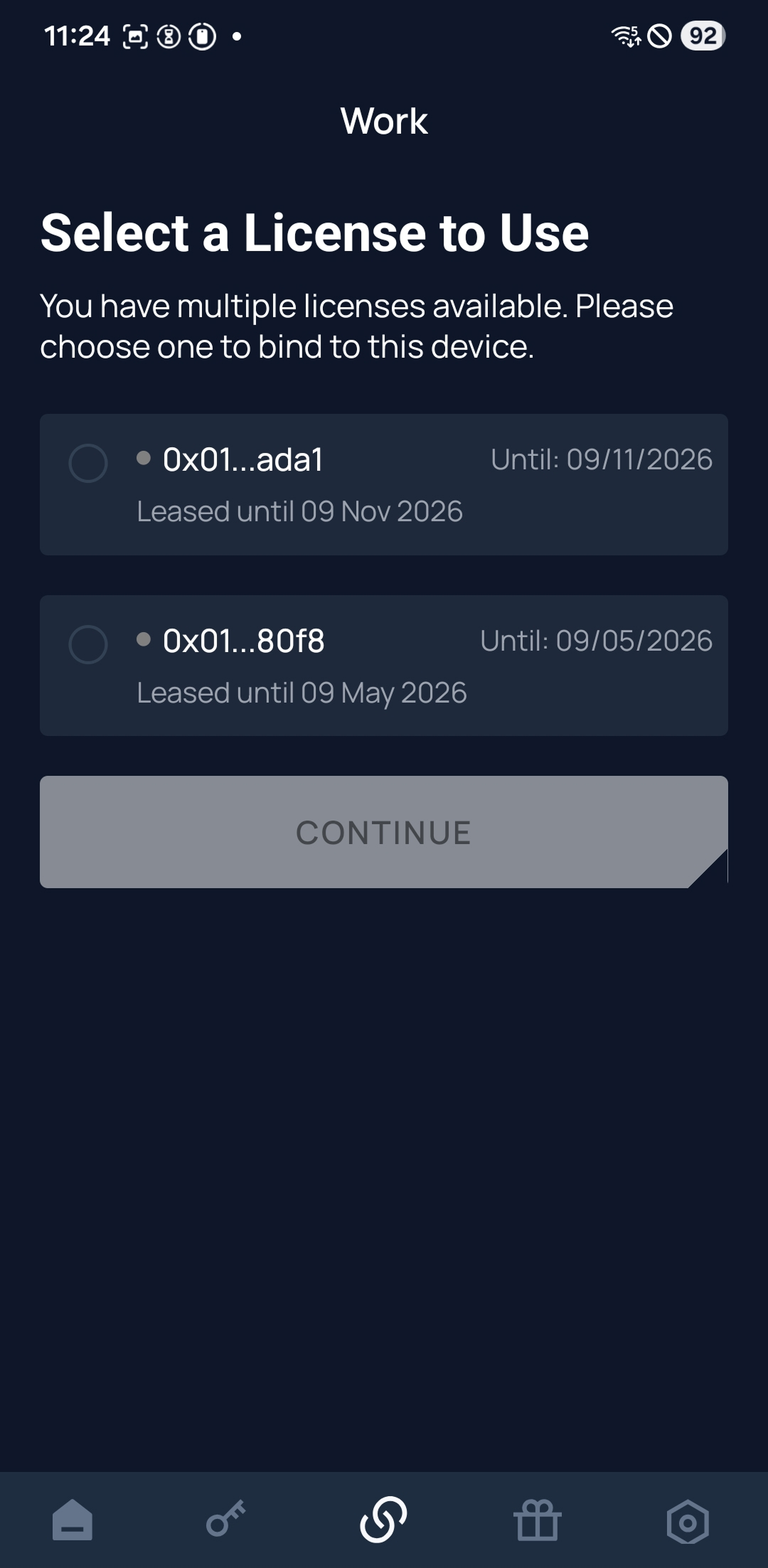
Step 2: Choose a license to bind

Unity app showing license selection options in the Work tab

If your device isn’t yet linked, select one of your available licenses from the list.
  • Review each license’s ID and lease expiration date before proceeding.
  • Tap Continue to bind the selected license to your device.
3

Step 3: Review your bound license

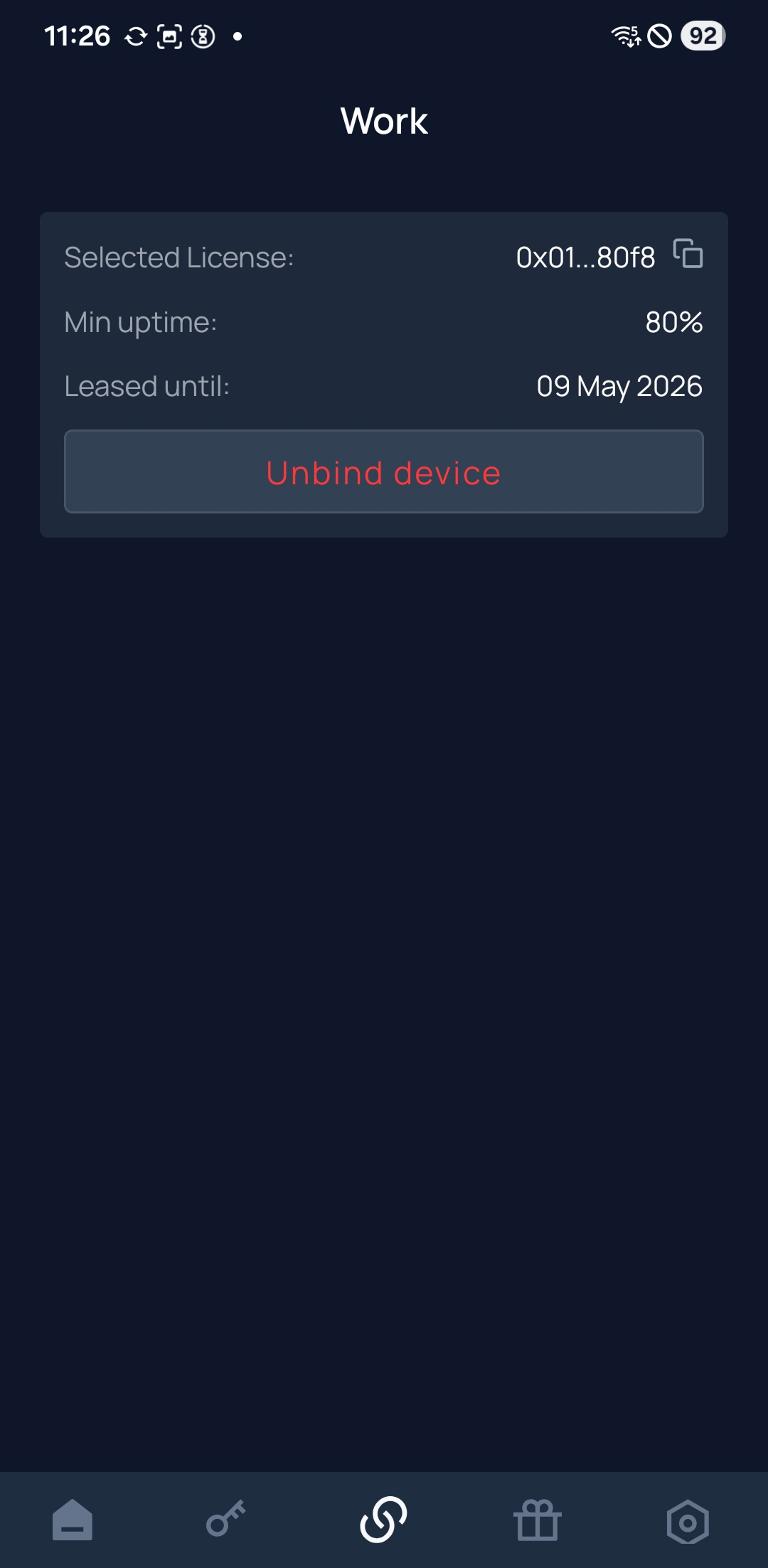
Unity app showing a license bound to the device with unbind option

Once bound, the Work tab will show the license details currently linked to your device.

  • You can view the license ID, uptime requirement, and lease expiration date.
  • Tap Unbind Device if you need to detach this license from your device.

The Unity License Dashboard

View real-time insights on your license performance, uptime, and rewards.

The Unity License Operator Dashboard gives you a live snapshot of your Unity performance and rewards. From uptime tracking to connection performance and system alerts, everything you need to monitor your license is in one place.
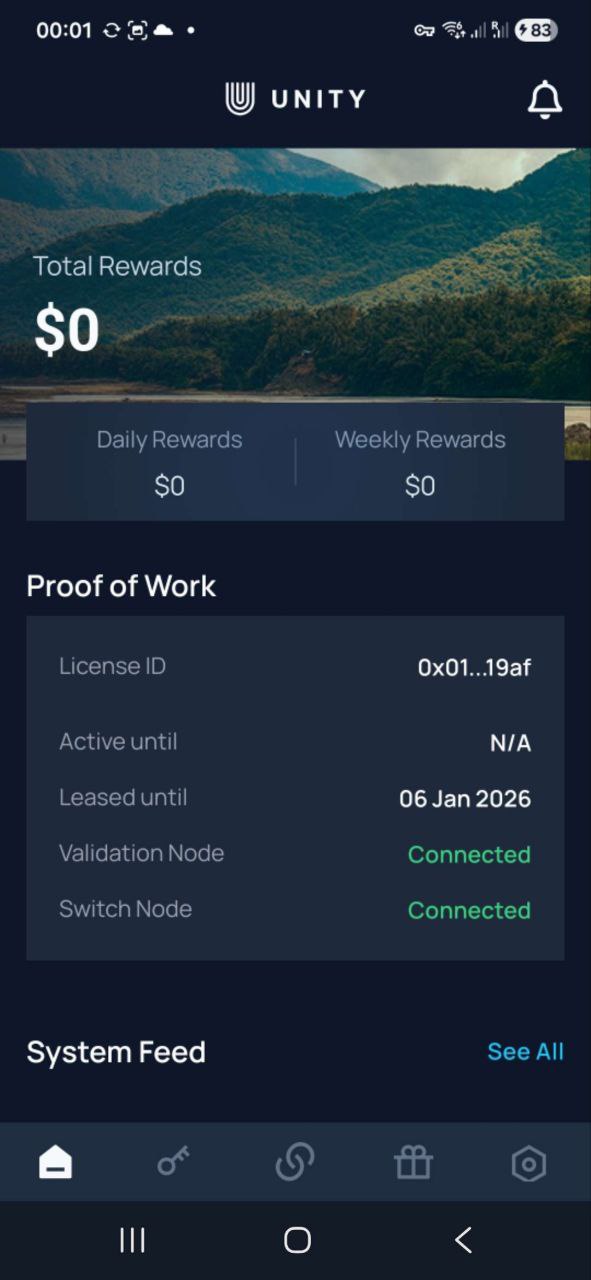
Unity ULO Dashboard preview on iPhone

Your Lease Agreement

Operating a Unity License means entering a digital agreement with a Unity Node Operator. It defines your role, how rewards are shared, and how performance is recorded transparently on-chain. Key elements include:

1Reward split

Specifies how earnings are divided between you and the Node Operator.

Example: If your license earns $100 and the split is 50/50, you receive $50.

2Monthly fee

Clarifies who covers the monthly network fee required to activate and maintain your license.

Example: The Node Operator pays the monthly activation fee.

3Lease duration

Defines how long your agreement remains active before renewal.

Example: The lease term is 1 year from the activation date.

Your License

Your Unity License is a special pass for one device (phone or tablet).

It’s a digital token that lets your device securely join the Unity network and earn rewards for verified work. Each license is issued and managed by a Unity Node Operator under a signed lease agreement.

License Overview

  • Single-device license

    Assigned to one registered device, such as a phone or tablet.

  • Node-managed lease

    Managed by your assigned node operator under a secure digital lease.

  • Network participation

    Enables secure participation in network testing and rewards.

Your Tasks

Your job is to set up and run the Unity app on your device. Once active, the app quietly verifies the global telecom grid through tasks like:

01
CALL QUALITY
Measures real-time voice and data quality, detecting latency or audio issues.
02
FRAUD PREVENTION
Monitors signaling and traffic patterns to detect suspicious behavior or unauthorized network use.
03
ROUTING ACCURACY
Identifies misrouted, incomplete, or dropped calls, ensuring correct global routing and termination.
04
CONNECTION RELIABILITY
Detects repeated connection failures or sudden disconnects that indicate unstable infrastructure.
05
SPAM & ABUSE DETECTION
Flags high-volume or automated calling and messaging behavior to help curb telecom abuse.
06
LATENCY & PERFORMANCE
Measures delay and jitter across the network to surface performance bottlenecks in real time.

From Detection to Delivery

  1. Step 1

    Device Verification

    Your device performs a brief verification task.

  2. Step 2

    On-Chain Recording

    Summarized metrics are committed on-chain for transparency. Only non-sensitive measurements are stored — never personal data.

  3. Step 3

    Insights Shared

    The findings are securely shared with the service provider so they can identify and resolve network issues quickly.

  4. Step 4

    Reward Distribution

    Service fees from carriers are distributed among participants. Lease agreements between license owners and lessees are executed automatically according to the agreed reward split.

Your Impact

Every test your phone runs and every data point it collects helps build a more reliable, more connected world. Your participation improves coverage, speeds, and call quality for countless people who rely on the network every day.

As the network expands, your rewards potential grows with it. More participants mean denser coverage, richer data, and stronger foundations for new telecom services, which translates into greater earning opportunities for every participants.

Unity is a multi-carrier, multi-country edge network powered by everyday mobile devices. Its decentralized design scales quickly, reaches more regions, and uncovers real-world issues traditional audits miss, all with transparent data and lower costs.

Your Rewards

You earn rewards for every verified test your device completes. The more tests it runs, the more you earn. Rewards are automatically split with your Unity Node Operator based on your digital lease agreement.

Potential Monthly Earnings

Based on early field data, Unity License Operators can expect average earnings of about $48 USD per month when all participation requirements are met. Rewards are shared equally between you and your Unity Node Operator under the standard 50/50 split.

Earnings are not region-specific; most locations show comparable results, provided your device remains connected, charged, and operating continuously.

Example Calculation

If your license earns $96 in verified rewards, and your lease agreement specifies a 50/50 split, your share would be $48.

Your rewards depend on a few key factors:

01
CONNECTION RELIABILITY
Reflects your device’s uptime and ability to stay connected while running Unity.
02
FAULT DETECTION
Rewards increase when your device helps identify genuine network issues or anomalies.
03
GEOGRAPHIC COVERAGE
Running Unity in underserved or high-value regions can apply reward multipliers.
04
CONSISTENCY
Regular participation over time improves reliability scores and boosts reward rates.
05
NETWORK CONTRIBUTION
Measures how much your activity strengthens the network’s verification coverage overall.

Your Withdrawals

Withdraw your rewards anytime, directly from the Unity App. Choose payout in cryptocurrency or directly to your bank account, whichever suits you best. Funds are never locked, and you control when and how to withdraw.

Rewards Withdrawal Options

  • Supported cryptocurrencies

    The app supports major assets including USDC, USDT, ADA, ETH, BTC, DOT and others.

  • Bank Transfer

    Rewards are withdrawable in partnered fiat options for supported regions.

No minimum withdrawal amount. You only cover standard network or banking fees.

Your Costs

Your license is leased from a Unity Node Operator, so there’s no upfront cost to you for holding it.

To activate and maintain your license, a monthly network fee of $1.99–$3.99 applies. Depending on your lease terms, this fee may be covered by you or your Operator.

Additional Costs

  • Data usage

    The app uses around 7 GB per month for network testing. Wi-Fi is prioritized whenever available, but some verifications require cellular data, so a portion may come from your mobile plan.

Your Risks & Privacy

Unity is designed to be low-impact and privacy-safe. The app never accesses personal data, files, or communications.

Usage & Privacy

  • Privacy

    The app does not access or store personal data, contacts, messages, or files. Only anonymized performance metrics are recorded for network verification.

  • Data consumption

    Uses around 7 GB per month for network testing. Wi-Fi is preferred, but some verifications require mobile data.

  • Battery impact

    Background tasks may slightly increase power use, roughly comparable to other light background service apps.

  • Network metrics

    Signal strength, latency, call quality, and connection reliability.

  • Device info

    Anonymized device type and OS version, used for accuracy and to prevent duplicate results.

  • Location data

    Coarse region-level data to locate network faults.

  • Timestamps & identifiers

    Anonymous timestamps and network IDs link test results and verify authenticity.

  • Fault data

    Error types and quality metrics used to classify and record verified network issues.

Unity continuously optimizes performance to minimize data, battery, and resource use while keeping your device fully responsive for normal tasks.

Frequently Asked Questions

Answers to common questions about setup, operation, rewards, and data privacy for Unity License Operators.

Getting Started

Does the Unity App run on all mobile devices?+
Yes. The Unity App is compatible with all Android and iOS smartphones. You can install it directly from the Google Play Store or Apple App Store. Installation and setup take less than a minute.
Do I need a specific SIM card, operator, or plan?+
No. Unity is network-agnostic and works with any SIM card, mobile operator, or plan. It also runs perfectly on Wi-Fi.
How do I start using the Unity App?+
Simply install the app and activate your Unity Node or License Operator account. Once activated, the app begins operating automatically.

Operation and Performance

If my phone is connected to Wi-Fi but has no cell service, will Unity still work?+
Yes. As long as your phone has an internet connection through Wi-Fi, Unity remains online. The app includes a connection indicator so you can confirm your node’s status at any time.
If I install Unity, will it affect my calls, texts, or data?+
No. Unity runs in the background and does not interfere with calls, messages, or regular mobile data usage.
Does Unity use my mobile minutes?+
No. Unity uses data, not voice minutes. When connected to Wi-Fi, it does not use mobile data either.
Can I run more than one Unity License on a single phone?+
No. Each phone can operate only one active Unity License at a time, though you can manage multiple nodes from the same device.
What happens when I go offline?+
You stop earning rewards while offline. Earnings resume automatically once your device reconnects to the internet.
How heavy is the app on battery?+
The Unity App is lightweight. Power use depends mainly on your network signal and task frequency. For best results, keep your device charged and in a good signal area.

Rewards and Earnings

When do rewards begin?+
Rewards start immediately once your Unity Node or License is active and online.
How often do earnings update?+
Your earnings update in real time — typically minute by minute — and are withdrawable instantly.
Do rewards ever expire?+
No. Rewards remain available indefinitely until you choose to withdraw them.
Which cryptocurrencies are available for payout?+
You can choose from multiple crypto payout options for instant withdrawals within the Unity App.
How are rewards calculated?+
Rewards are based on the type and value of services your node provides. The app offers a full breakdown of your earnings and license-generated crypto rewards.
What does it cost to operate?+
Most operators pay between $1.99 and $3.99 USD per month per active license. Inactive or offline licenses are not charged.

Availability and Compliance

Where is Unity unavailable?+
Unity is not available in regions that restrict VoIP services or in locations under international sanctions.
Does the Unity App auto-update?+
Yes. When a new version is required, the app will prompt you to update automatically.
What personal data does Unity access?+
Unity does not access or request personal data. It is fully GDPR-compliant and privacy-focused.